


Real Drum electronic drums set
4.521.03K Reviews
App Specs
- Version
- 11.17.17
- Updated On
- License
- Free
- Downloads
- 100,000,000+
- Developer
- Kolb Apps
- Categories
- Music
- Platform
- Android, iOS
Screenshots
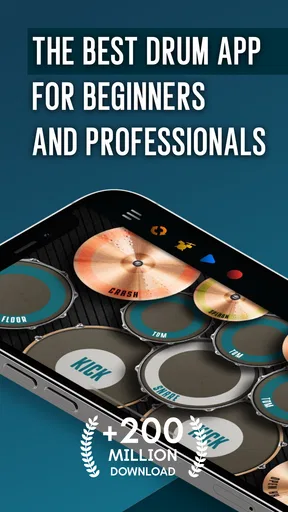
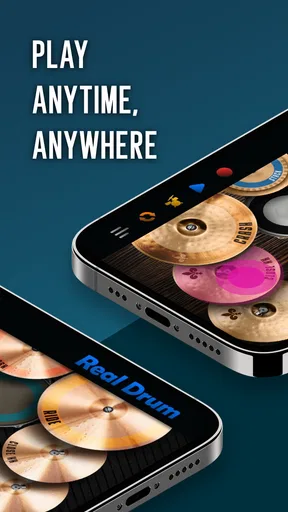
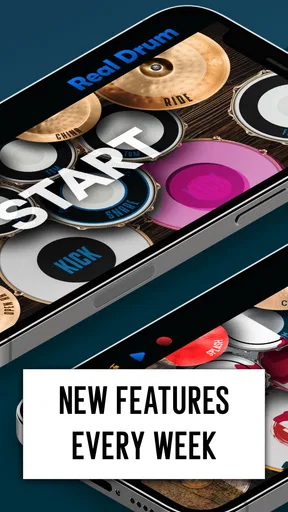
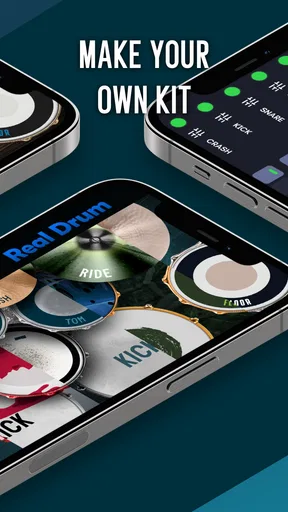
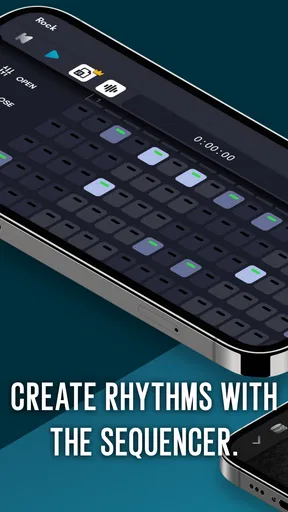
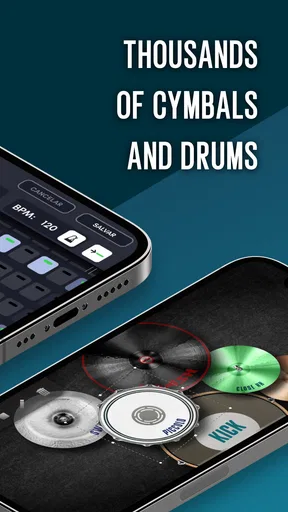
 Analysis by AppCompare
The most appealing idea behind this drum game is simple: it turns a touchscreen into a playable kit, so I can tap out rhythms without setting up physical drums. That makes Real Drum useful for quick practice and musical play in places where a full kit would be impractical. I see it less as a replacement for an acoustic or electronic drum set and more as a convenient way to explore patterns, keep my hands busy, and test whether an idea has rhythm.
Why tapping a kit changes the experience
On a phone, the kit is always close at hand, and there is no need to carry sticks or make room for stands and cymbals. I can open the game for a short session, try a beat, and put it away again. That ease of access is the main advantage: it lowers the effort required to start playing. It also changes the feel of drumming. Fingers on glass do not give the rebound, reach, or physical feedback of sticks on drumheads, so the app works best as a compact practice surface rather than a faithful substitute for playing a real kit.
That distinction matters if you are deciding what to learn. A touchscreen can help me get familiar with the order of hits in a rhythm and develop a sense of timing, but it cannot teach the full physical technique of striking a drum or coordinating with pedals. I would use it to sketch a groove or rehearse a basic sequence, then move to a real kit or dedicated electronic drums if my goal were to build dependable stick control.
Guides and Analysis on Real Drum electronic drums set
How I would use it for short practice sessions
A useful way to approach a session is to choose one small goal instead of tapping randomly for a long stretch. I might focus on a steady kick-and-snare pattern, then add a cymbal accent only after the pulse feels consistent. The lessons can give beginners a guided starting point, while the metronome offers a way to keep a rhythm from gradually speeding up. That combination makes the app more purposeful than an open set of pads alone.
I also find it helpful to treat recordings as a listening tool, not just something to share. If I record a short attempt and listen back, I can notice whether the accents land where I intended or whether the beat drifts. This is a practical way to check progress without turning every practice session into a performance. Keep the first recording simple; if a groove is difficult to follow, adding more hits usually makes it harder to diagnose the timing.
A realistic place for a virtual drum kit
Picture a beginner with ten spare minutes before heading out: opening the game, following a short lesson, and repeating a pattern with the metronome is more realistic than assembling a kit for such a brief window. It also suits a music fan who wants to try a rhythm while listening to a song, or someone who wants a low-commitment introduction before investing in equipment. The free-to-play entry point makes that kind of casual trial easy, although optional in-app purchases range from $0.99 to $18.99 per item.
For a quieter household or a shared room, a phone can be easier to use than an acoustic kit, but the experience still depends on the device’s sound and touch response. Headphones may help when you want to hear the taps more clearly without filling a room with device audio. For actual quiet practice, though, the crucial question is whether the phone’s output and controls suit your situation; the app itself does not make a screen feel like drum pads under sticks.
Worth Reading Before You Choose

Google Calendar Makes a Crowded Week Easier to Manage

Ludo King Makes the Most of the Minutes Between Plans

Baby Panda World Brings Quick Play to Modern Phones, but Its Game Library Feels Busy

ESPN’s Live Game View Makes Following Close Games Easier

QuizzLand Review: A Good Fit for Short Trivia Breaks, Not Every Player

Basketball Stars: Multiplayer Is Fast, but Can It Recover When Matches Go Wrong?
Where it sits among music apps
Compared with rhythm games built around hitting prompts in time, this is closer to an instrument-style toy: the attraction is tapping the drum parts directly rather than following a song’s scoring lane. Compared with a dedicated drum-learning course, it is more immediate and less equipment-heavy, but a physical kit offers more realistic technique practice. I would choose this app for accessible rhythm exploration and a quick session, while choosing a real instrument or structured teaching setup when feedback on posture, sticking, and limb coordination matters.
There is also a useful trade-off between convenience and screen space. A larger phone or tablet can make separate kit areas easier to reach, especially if you are trying to play a pattern with both hands. On a small screen, fast sequences can feel cramped, and accidental taps can interrupt a groove. Before judging your timing, try a slower pattern and make sure your fingers can reach the pads comfortably; some apparent mistakes may come from the layout rather than your sense of rhythm.
So, I recently got my hands on the Real Drum app, and let me tell you, it was a bit like uncovering a hidden gem in the world of music apps. Imagine turning your phone or tablet into a full-fledged drum kit without needing to haul around the real deal. It’s like having your own private jamming session wherever you go, and I’m here to spill the beans on what makes this app tick.
Getting Started: Setting Up Your Kit
First things first, installing the Real Drum app was a breeze. A quick download from the app store, and voilà! You’re pretty much ready to rock. Once you open the app, you’re greeted with a clean and intuitive interface that doesn’t leave you scratching your head. No need to be a tech wizard to figure this one out.
The app offers a variety of kits you can choose from, each with its own unique sound. Whether you’re into classic rock, jazz, or even electronic beats, there’s something that’ll tickle your fancy. You just tap on the kit you want, and you’re ready to start drumming away. The responsiveness is pretty impressive too; taps register instantly, which is crucial when you’re trying to keep up with a fast beat.
Playing Around: Features That Stand Out
Now, let’s talk features. One of the standout aspects of Real Drum is the sheer variety of sounds you can experiment with. The app boasts a variety of drum pads, each offering different sounds like snares, kicks, cymbals, and toms. You can even adjust the volume of each element to fine-tune your mix, which is perfect for those who love to customize their sound.
Another cool feature is the ability to record your sessions. This is a game-changer if you’re someone who likes to keep track of your progress or wants to share your sick beats with friends. It’s like having a mini recording studio right in your pocket! Plus, the app allows you to export your tracks in various formats, making it easy to share your creations.
Learning and Improving: Tutorials and Lessons
For beginners or those who want to brush up on their skills, Real Drum offers a series of tutorials and lessons. These are super handy because they guide you through different rhythms and techniques. The lessons range from basic to advanced, so whether you’re just starting out or you’re a seasoned drummer looking to refine your skills, there’s something for everyone.
The app also includes a metronome feature, which is essential for keeping time. Trust me, there’s nothing more frustrating than realizing you’re off-beat halfway through a session. With the metronome, you can practice until your timing is impeccable.
The Social Element: Sharing Your Beats
What’s music if you can’t share it, right? Real Drum makes it easy to connect with other music enthusiasts. You can share your recordings directly to social media platforms, which is perfect for getting feedback or just showing off a little. It’s like taking your bedroom jam session to a global audience.
Plus, the app has an online community where you can exchange tips and tricks with fellow drummers. It’s a great way to stay inspired and keep pushing your boundaries.
Final Thoughts: Is It Worth It?
So, would I recommend the Real Drum app? Absolutely! Whether you’re a beginner looking to dip your toes into the world of drumming or a pro wanting to practice on the go, this app has you covered. It’s packed with features, easy to use, and offers a level of customization that’s hard to beat.
At the end of the day, it’s all about having fun and expressing yourself through music. And with Real Drum, that’s exactly what you get. So, go ahead, give it a try, and let your inner drummer shine!
Who will get the most from it
Kolb Apps’ music game has been around since April 4, 2012, and its current version is 11.15.3. It has a 4.4 average from around 1.6 million ratings, with over 100 million installs and about 21,000 written reviews. Those figures suggest broad appeal, but they do not mean every player will enjoy tapping on glass. The game is free, rated for Everyone, and available on devices running Android 7.0 or later; purchases are optional and priced from $0.99 to $18.99 per item.
I would especially recommend it to curious beginners, casual players, and drummers who want a quick way to work through a rhythm when they are away from their equipment. It can also be a handy first step for someone who is unsure whether drum patterns are enjoyable enough to pursue. If you already play, the best use is likely informal experimentation or a timing refresher, not a substitute for practicing on the instrument you intend to perform on.
It is less suited to anyone who expects formal instruction to correct hand technique, or who needs the feel and coordination of a full kit. The lessons can help you follow rhythms, but an on-screen surface cannot watch your posture or tell you whether your stick motion is efficient. In that situation, a teacher, a physical practice pad, or an electronic kit will offer feedback this game cannot provide.
Small habits that make sessions more useful
For a more focused routine, I would pick one lesson or one short rhythm, set the metronome, and repeat it before changing anything. Then I would record a take and listen for consistency rather than judging it by how busy or impressive it sounds. This makes the recording feature useful even if I never share a track: it turns a vague feeling of “that seemed okay” into something I can evaluate by ear.
When the pads feel crowded, I would slow down instead of immediately blaming my coordination. Repositioning the device or using a larger screen can make a noticeable difference to reach, and a simpler pattern helps reveal whether missed hits come from timing or from tapping the wrong area. Adjusting individual pad volumes can also make a practice mix easier to hear: bring the part you are concentrating on forward, then restore a balanced mix when you want to play freely.
One practical question is whether this is enjoyable without buying anything. Since the game is free to start, it is easy to try the basic experience before deciding whether any optional purchase is worthwhile. I would spend time with the lessons, kit choices, and recording workflow first; there is no reason to treat an in-app purchase as a prerequisite for finding out whether touchscreen drumming suits you.
My recommendation after weighing the trade-offs
Real Drum works best when I judge it by what a phone-sized instrument can reasonably do. It makes drumming accessible in spare moments, encourages experimenting with different sounds, and offers enough structure to keep a beginner from facing a blank set of pads. The trade-off is inherent in the format: tapping a screen is convenient, but it lacks the tactile response and physical training of actual drums.
If your aim is to explore beats, practice simple timing, or have an easy music-making option on a commute break or at home, I think it is worth trying. If you want realistic technique practice, detailed personal coaching, or the dynamics of a live kit, look to a physical instrument or a more structured learning route instead. I would keep this app as a low-pressure companion for ideas and short sessions, while treating real drum practice as the next step when those ideas need to become dependable playing.
Pros
- User-friendly interface for beginners
- Realistic drum sound quality
- Customizable drum kits
- Variety of loops and samples
- Supports MIDI controller integration
Cons
- Contains in-app ads and purchases
- Limited free features available
- May lag on older devices
- High battery consumption
- Requires stable internet for updates
FAQs for Real Drum electronic drums set
What features does the Real Drum app offer?
Real Drum offers a wide range of features including a variety of drum kits, high-quality sound samples, and customizable drum pads. Users can also record their sessions, access a library of loops, and use multi-touch functionality for a more realistic drumming experience. The app is suitable for both beginners and experienced drummers.
Is Real Drum suitable for beginners?
Yes, Real Drum is designed to be user-friendly for beginners. It includes a tutorial mode and a range of lessons to help new users understand the basics of drumming. The intuitive interface and easy navigation make it accessible for those just starting out, while also offering more complex features for advanced users.
Can I use Real Drum offline?
Real Drum can be used offline, making it convenient for practice sessions without an internet connection. However, some features like downloading new kits or accessing certain online resources may require connectivity. This offline capability ensures you can practice anywhere, anytime, without worrying about data usage.
How customizable are the drum kits in Real Drum?
The drum kits in Real Drum are highly customizable. Users can change the appearance and sound of individual drum pads to suit their preferences. The app allows you to import your own sounds and create personalized kits, providing a tailored experience that caters to your unique drumming style.
Does Real Drum support recording and sharing of sessions?
Yes, Real Drum allows users to record their drumming sessions directly within the app. Once recorded, these sessions can be saved and shared with friends or on social media platforms. This feature is perfect for musicians who want to track their progress or showcase their skills to a wider audience.


